
Screenshots
About Blend Me Photo Editor
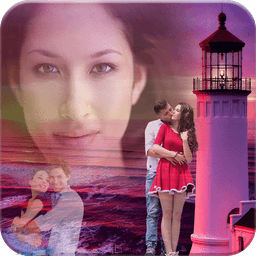
Blend Me Photo Editor lets you blend multiple images together with powerful effects and creative overlays. Layer your photos with precision, adjust opacity and fade to fine-tune each blend, and transform ordinary shots into stunning composite artwork.
The AI Photo Cutout tool removes backgrounds instantly — select the objects you want to erase, and the editor handles the rest. Choose from thousands of ready-made backgrounds across categories like romance, nature, travel destinations, and solid colors. No complex masking required.
Shape Blend turns your photos into eye-catching designs. Frame your images in hearts, circles, rectangles, triangles, or 3D shapes for a polished, stylish finish. Shape overlays add visual interest and make your edits stand out.
A comprehensive filter library gives you creative control over mood and tone. Whether you're going for vintage, vibrant, or moody aesthetics, apply effects that complement your photo in one tap.
Full photo editing tools let you crop, rotate, and flip images with ease. Add text, stickers, overlay effects, and color adjustments to build layered compositions. Manage layers intuitively so complex edits stay organized and reversible.
The background collection spans both portrait and landscape orientations, organized by theme — Love, Nature, Travel, Birthday, Beach, Flower, Night, Ship, Sunset, Sports, Waterfall, and more. New backgrounds upload daily, so you always have fresh options to explore. Can't find what you want? Submit a request and the team adds it to the library.
Upgrade to the Pro version for unlimited access. Pro members unlock thousands of premium backgrounds, exclusive shapes, advanced effects, and a full font library. Edit and remix without ads for a seamless creative experience.
Blend Me Photo Editor is built for anyone who wants to create polished photo compositions without professional design skills. Mix your creativity, showcase your style, and produce images that stand out.
Pros & Cons
Pros
- AI background removal requires no manual masking or complex selection
- Thousands of themed backgrounds organized by category for quick inspiration
- Layer-based editing system keeps complex compositions organized and reversible
- Shape blend frames let you transform photos into stylized designs instantly
Cons
- Free version includes ads; Pro subscription needed for ad-free editing
- AI cutout tool quality depends on image complexity and subject contrast
- Large background library requires active internet connection to browse and download
- Pro subscription required to unlock full background collection and premium effects
Related Apps

GIMP
Open-source photo editor and digital art studio with professional tools for retouching and illustration.

Paint.NET
Free photo editing software with layers, effects, and unlimited undo for Windows.

Photoscape
Photo editor with viewer, collage maker, GIF creator, and batch tools—all in one free app.

3D Emoji Face Camera
KEVIN STUDIO
3D emoji face camera with live filters and animated effects. Create fun selfies instantly.

Profile Picture Downloader HD
helalik
Download Instagram profile pictures in HD — no login required, view and save instantly.
Beauty Camera Plus
Photo Created
Photo editor with beauty filters for selfies, portraits, and real-time enhancement — free download.
Latest Articles

Best AI admin task automation apps for desktop in 2026 (we tested 7)
Jul 11, 2026

Best AI coding tutor apps for desktop in 2026 (we tested 7)
Jul 11, 2026

Best apps for the *arr media stack on desktop in 2026 (we tested 7)
Jul 11, 2026

Best classic Doom source port apps for desktop in 2026 (we tested 7)
Jul 11, 2026

Best FFXIV companion apps for desktop in 2026 (we tested 7)
Jul 11, 2026